Showing posts with label Bluetooth. Show all posts

Tuesday, 29 March 2016

Xiaomi unveils MiBox 3s Enhanced Edition TV box

BY Cavarii IN , , , , , , 1 comment

Xiaomi has revamped the Mi Box s and is launching it as a MiBox 3s Enhanced Edition. In addition to the slight spec bump, the box gets a new remote control that will undoubtedly remind you of the Wii Remote that made Nintendo's gaming console quite popular back in the days.

Xiaomi’s latest TV box will be available in China starting March 18th 2016.  The MiBox 3s Enhanced Edition has some pretty powerful hardware.

This Mi Box 3 Enhanced Edition is extremely fast? But how fast could it be?

Under the hood, the processor has been upgraded to a MediaTek MT8693, a 64-bit hexa-core processor running at 2 GHz max, up from the quad-core setup of last year. RAM has also been doubled to 2 GB LPDDR3 and storage is now 8 GB of eMMC 5.0 flash.

Together with the PowerVR GX6250 graphics chip, the Mi Box 3s Enhanced Edition is promised to be 80% faster in CPU processes and a whopping 240% better when it comes to the GPU. Besides that it also support OpenGL ES 3.1

The MiBox 3s Enhanced Edition features a MediaTek MT8693 hexa-core processor with two ARM Cortex-A72 CPU cores and four ARM Cortex-A53 cores and PowerVR GX6250 graphics.


It also has 802.11ac WiFi, Bluetooth 4.1, two USB 2.0 ports, and HDMI 2.0 output with support for 4K video at 60 Hz.  802.11ac 2X2 WiFi improved the transfer speed up to 300 Mbps

Mi Box 3 Enhanced Edition is using 4.1 Bluetooth which has a low power consumption

Mibox 3s supports H.265 10bit 4K@60 FPS with Dolby and DTS Sound

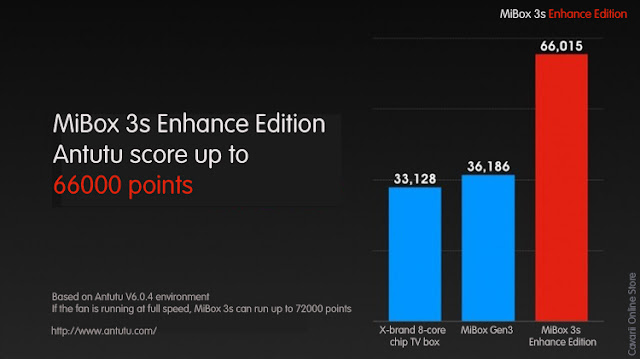
All of us like to compare a device's performance by using Antutu. Mi Box 3 Enhanced edition scored up to 66,016 which almost doubled the Mi Box 3
The box measures about 4″ x 4″ x 1″, which makes it a lot bigger than last year’s MiBox Mini… but that makes sense, since the new model is also a lot more powerful.

The MiBox 3s Enhanced Edition is still an Android box, though not an Android TV one. It naturally uses the OEM's Android-based MIUI TV, which is based on Android 5.1. That could give it at an advantage of having access to apps that would normally be blocked on Android TVs because they weren't designed for it.

We know that heating will slow and affect the performance of a gadget or device. In this MiBox 3s Enhanced Edition we have our own unique cooling system which automatically adjust the speed of fan
Xiaomi thinks that the upgrade is so hot, figuratively and literally, that it put its own "unique cooling system", that adjusts the speed of the fan. Yes, this small TV box has a small fan inside.

Perhaps the next, or probably even more, interesting upgrade is the remote control. Xiaomi has added a sensor inside, it says, that you can use to play games. Presumably, it means a motion sensor, which pretty much makes it like a Wiimote. The strap makes that even more evident. That said, there really aren't many Android games that could take advantage of swinging motions.


Monday, 1 February 2016

Xiaomi Roidmi: A FM modulator and ‘Smart’ & ‘Secure’ Car Charger

BY Cavarii IN , , , , 2 comments


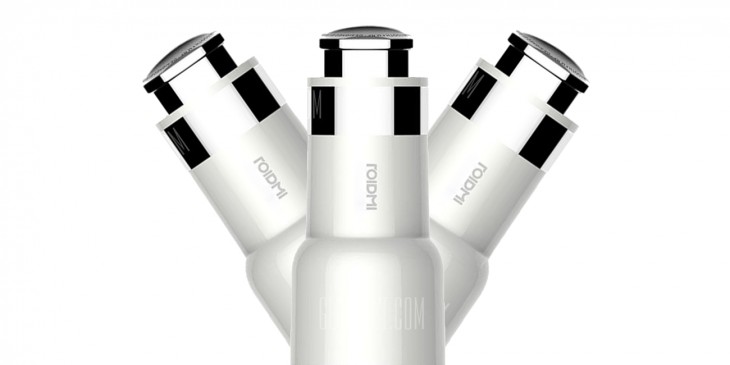
Xiaomi ROIDMI is a car charger but with the addition of Bluetooth and FM transmision function.


Xiaomi Roidmi as a Secure Charger

Although there is a variety and quality of car charger, nowadays. But if we go back to those years when most of the car chargers were of low cost, quite rudimentary and had very low amperage. Thus, they would experience the eternal burden and sometimes were unworkable. The most dangerous aspect of them was that the changing amperes in the car which could even produce a short circuit in the phone or the charger.


The Xiaomi Roidmi offers an amperage of 3.1 A. The amperage is divided into two ports, one with 2.1A and other with 1A. The first port can be used to charge a phone and other can provide support to a dash cam or any other low ampere device like a USB fan. In addition to this, the two ports are also illuminated with a blue LED.

Xiaomi has included several security measures in its charging. These measures includes an anti-short circuit system, protection against rises in temperature. It also has a system to detect the type of device and ensuring the best performance for that device.

Xiaomi Roidmi as a Bluetooth FM Transmitter

Apart from the main function of the device: charging gadgets, Roidmi also have some additional features.

The Roidmihas two wireless connections, a Bluetooth 4.0 connection and a FM transmitter. It enables it’s users to play music from their phones on the car's FM tuner. This is something that may not be necessary because many new cars nowadays have an auxiliary connection or a Bluetooth system. But for those who are deprived from this technology in their cars, which we believe majority of the cars out there, for them Xiaomi Roidmi will be really useful.


Using it on an iPhone
You can connect Roidmi to your phone using the Mi Smart Home app, you can scan the QR code below and install the App on your iPhone.

If you have an iPhone you must connect to Bluetooth Roidmi with the default frequency of 96.4MHz, which is pre-set when shipped out from the factory.

However, if the default 96.4Mhz crashes with an existing FM station frequency in your area, it will cause interference between the ROidmi and the FM stations' broadcast. What you can do is to borrow an Android phone and install the Roidmi app (see QR code below), and manually search for a frequency on your car's FM that 's not currently occupied by any FM station, then use the Android Roidmi app to set the broadcasting frequency to the unoccupied range.

Thereafter, your music streamed from your iPhone will sync with the Roidmi through bluetooth, and Roidmi will broadcast the music with the newly set FM frequency.


Using it on An Android Phone

As far as the radio is concerned, android smartphone is more likely to be used. Because you can use the intuitive Roidmi Driver Android app (see QR code above) to set the frequency at which it will issue the Xiaomi Roidmi thus avoid interference with other radio stations.


Supported Car models

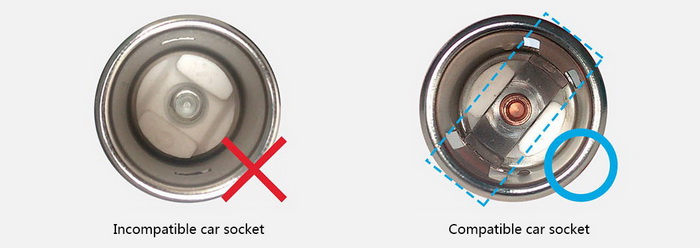
Note: Before buying Xiaomi Roidmi, we must inform you that unfortunately it is not compatible with all cars. The seller offers the following list of unsupported cars:
PEUGEOT 301 / PEUGEOT 2008, DS 3 SKODA Fabia / Rapid Spaceback, TOYOTA Vois, Changan Mazda 2, Dongfeng Honda XR-V, Renault Captur, Honda Odyssey / City / Vezel / Crider / Shuttle, CITROEN Elysee.  No NISSAN, SUBARU or KIA for all models.


Installation steps


The following are translated from the original Chinese Manual coming with the Roidmi.

Main Specs


Installing unit

1. Remove the cover of the cigarette lighter (if any) in the car, and make sure there is no waste inside of the cigarette lighter.

2. Insert Roidmi to the cigarette lighter. When flashing, pair the Roidmi device via Bluetooth. When there is a steady light, pairing is successful and the device is connected via Bleutooth.


Setting Up using Roidmi App recommendations (for Android Apps only)

1. To install the player and Bluetooth connection, please read the installation guide in the Roidmi App;

2. The default frequency is 96.4MHz

3. After a successful pairing Roidmi with a smartphone, you can set the FM radio frequency via phone, or use an automatic search of FM frequency for broadcasting music files stored on your phone

4. We recommend an FM frequency in accordance with the recommendations of the App to maintain the highest sound quality;

5. If your smartphone does not find Roidmi, make sure that Bluetooth is enabled on your phone, and cigarette lighter has a power supply; if the device do not pair for a long time, try to connect to the new device via Smartphone or restart Roidmi.


Wednesday, 10 June 2015

Xiaomi Launches Yeelight Smart Lamp

BY Cavarii IN , , , , No comments


The Xiaomi Yeelight Bedside lamp is controllable via smartphone. The lamp throws out light in 16 million colours and comes with a support for gestures to adjust the lamp's brightness, power on/off, and colour change.


 Gestures such as clockwise, anticlockwise has their own function and waiting for you to explore

 This light can be controlled using bluetooth as well


Take a closer Look


Shape like a thick candle


This is the pacakaging 

The sticker on top of the lamp reads "Slide along the edge of the lamp to adjust the brightness" 

The two buttons on top - ON/Off switches and switching scenarios 

The bottom is the product specifications and info

 Closer look at the lamp

 The power port

Power cords

Tuesday, 9 June 2015

Overview Of The Xiaomi Bluetooth Headset

BY Cavarii IN , , 2 comments


Xiaomi has launched a new Bluetooth headset to compete with the like of Jabra and Plantronics. The hands-free set is positively feather weight, and weighs only 6.5 grams net. The device supports Bluetooth 4.1, and Xiaomi claims a standby time of 180 hours and a talk-time of 5 hours for the device. Xiaomi says it takes the device around 2 hours to get fully charged.

Supported by bluetooth 4.1, high sound quality and optimized compatibility with 4g network is guaranteed. The components come from world-class suppliers who work with Sony and Jabra.

The device comes in a white cardboard box, which bears the familiar stylized logo of Xiaomi.

On opening the packaging, you can see the headset itself.

The headset indicates with a blue LED indicator when it’s connected to a device like a smartphone via Bluetooth, and will light up red when charging.

This is how the earpiece looks like without the covering.


The headset comes with a button on top, which allows users to switch the device connected with the head.

At the bottom of the headset, in the position where there would traditionally be a microphone, Xiaomi has included a micro USB port, which can be used to charge the device.


At the bottom of the headset, in the position where there would traditionally be a microphone, Xiaomi has included a micro USB port, which can be used to charge the device.


The accessories included in the package are pretty simple, a short USB to micro USB cable for charging, and three different sizes of silicone sleeves, which come in S (small), M (medium) and L (large). The packaging also contains an instruction manual to get you started in case you are having issues syncing it to your device.

Mi Bluetooth Headset is very light and easy to bring around. There are 2 colors to choose from that is black and white. 


For your info, the design of Mi Bluetooth Headset won the IF award from Germany which is similar to Oscar's award.

Mi Bluetooth Headset using bluetooth 4.1 technology which support it to connect with 2 devices. If you have iphone and Android phone in the pocket, it will connect to the one which is ringing. The noise cancellation also great and reduce the noise in the environment and enhance human's voice.

According to Xiaomi, the battery can lasts for 180 hours which is enough for 1 week usage. Besides that, It only took 2 hours to charge it to full battery stats as well. 

One disadvantage of this Mi Bluetooth Headset the volume button was sacrificed for the appearance. Therefore you need to adjust it manually using your phone.


In addition to attending to phone calls, the headset can be used for listening to music, however, the device doesn’t support stereo output, so you’ll have to make do with Mono aural audio, unfortunately.

Overall, the Xiaomi Bluetooth headset is a practical device, which looks good and has a clear sound for everyday requirements. The build quality is good, and it is comfortable to wear for long periods because of its light weight construction.


Dimension
Size: 5.6 cm * 1 cm × 0.8 cm
Weight: 6.5 g
Color: white models / black models

Basic parameters
Model: LYEJ01LM
Charging time: 2 hours
Standby time: 180 hours (approximately one week)
Talk time: 5 hours
Communication distance: 10 meters
Bluetooth specification: V4.1 Bluetooth version
Bluetooth protocol: HFP / A2DP / HSP / AVRCP

Package Contents
Bluetooth headset x 1
Ear cap x 3 (S, M, L three sizes)
Charging cable x 1
User Manual (in Chinese)